
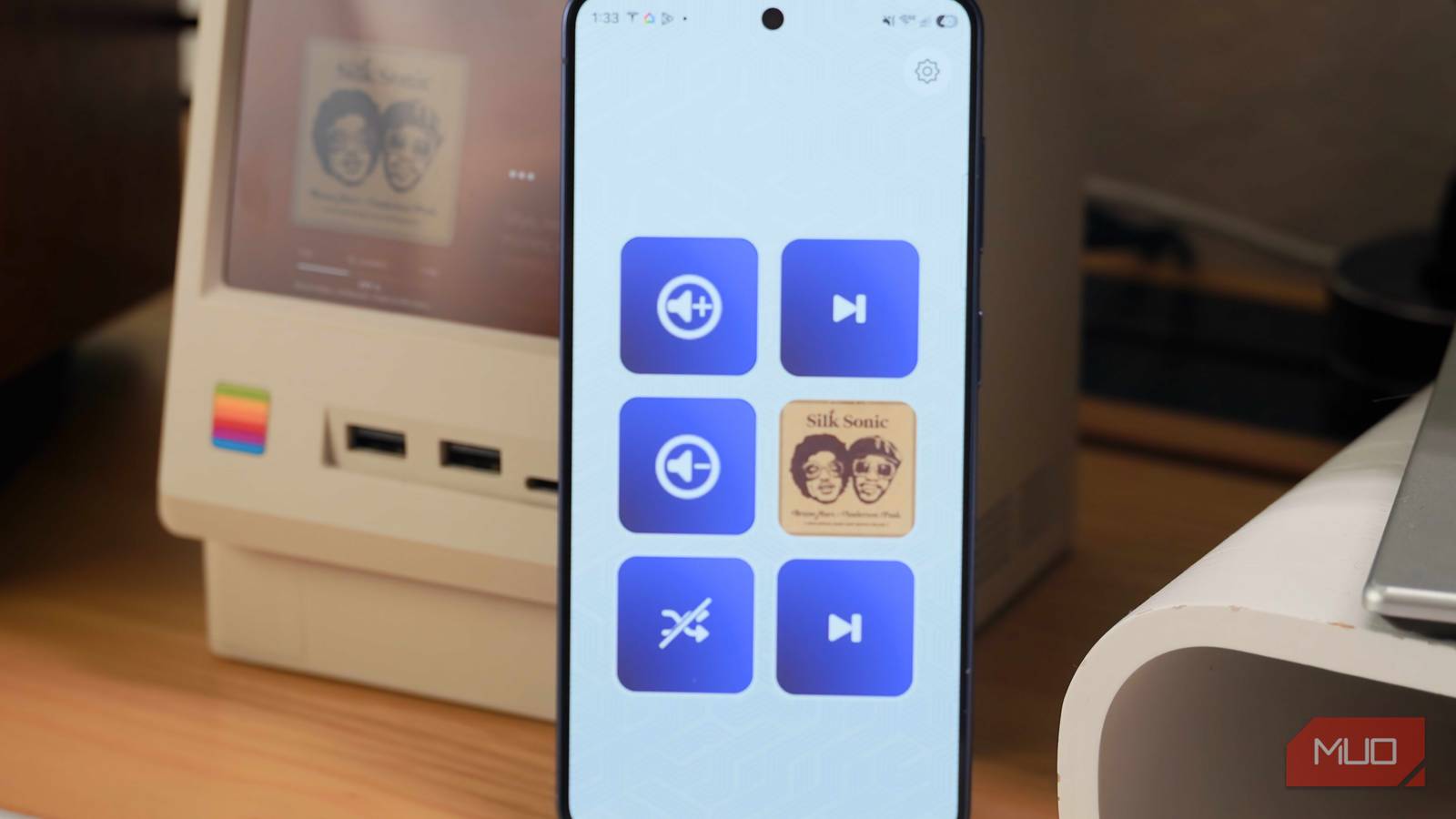
Elgato’s Stream Deck is a customizable macro pad designed for streaming, but it’s widely regarded as a secret weapon for power users in the productivity community. The smallest Stream Deck offers six keys, each with its own LCD screen, and costs $60. It’s a niche tool that’s appealing to desk setup maximalists like myself, although there’s a better way. You can turn the Android phone (or iPhone) you already have into a virtual Stream Deck using a free app — and it’s official.
The Elgato Stream Deck Mobile app is one of my favorite pieces of iOS or Android software. There’s no risk in trying it out for yourself, as both the mobile app and desktop companion app are free. You could use it as a desktop macro pad if you find Stream Deck hardware too expensive, a portable macro pad for replicating the Stream Deck experience on the go, or a free way to see if a hardware macro pad is worth the cost. The possibilities are endless, and before you go out and buy a Stream Deck, you need to take this free alternative out for a spin.
I love my Stream Deck, but it’s a tough sell
Why not put the smartphone you already have to good use?
I spent years eyeing a Stream Deck of my own before shelling out $100 for the Stream Deck Neo. Even after placing the order, I wasn’t sure it’d improve my productivity enough to justify paying for a dedicated gadget. Only then did I discover that you don’t need specialized hardware for the Stream Deck experience at all. It certainly helps, and I love my Stream Deck Neo, but the Stream Deck app is just as good and doesn’t cost a cent.
There’s no catch — you just need to download the Stream Deck app for desktop on your Mac or PC and do the same for the mobile app on your smartphone. After that, you can start creating actions, layouts, and profiles on the Stream Deck desktop client. You can use Stream Deck macros to automate launching apps, simplify complicated keyboard shortcuts, or find files and folders. I primarily use my Stream Deck mobile app for music playback control and photo editing. The desktop client lets you customize the macros that appear on your Android phone to match your workflow.
To pair your Android phone with a computer, you’ll have to launch the Stream Deck mobile app and ensure the desktop client is active on your PC. Then, choose the right computer from the list of nearby Stream Deck desktops, and confirm the pairing codes match across the devices. Your phone and computer will then be linked, and you can start adding actions or shortcuts as macro keys to the Stream Deck mobile app.
The free version of the Stream Deck mobile app only supports six macros on a profile. Subscribing unlocks up to 64 customizable keys, but there’s really no reason to upgrade for $2.99 per month. Those six free keys match the functionality of the Stream Deck Mini, which is a $60 hardware accessory. In other words, it’s more than enough. You can build multiple profiles and switch between them using the desktop client, effectively giving you more than six keys.
I use six shortcuts for photo editing with the Pixelmator Pro app on macOS: Select, Denoise, ML Enhance, Return, Delete, and Export. All my needs are handled by the free Stream Deck app, and having macros for these photography workflows saves me minutes during every editing session. Over the course of a longer project or weeks of work, those minutes saved turn into hours. Specifically, I can use editing tools normally hidden behind menus or triggered by complicated keyboard commands with the press of a button. I don’t even need to think about picking up my mouse or keyboard, speeding up processes.

This desktop gadget wasn’t meant for productivity — but it made me faster at everything
When I’m not gaming, I’m gaining
The Stream Deck app works at a desk or on the go
Use your phone as a macro pad for your laptop while working remotely

Usually, free software alternatives to pricey hardware products leave quite a bit to be desired. That isn’t the case with the Stream Deck mobile app. In fact, I think the no-cost app is more versatile than the hardware macro pads, having tried both. I love using the Stream Deck Neo at my desk, but it isn’t portable. I want to be just as quick at my desk setup as I am working from a coffee shop on my laptop.
I can do that using the Stream Deck mobile app on my Android phone, and it’s completely wireless. I’ve tried moving my Stream Deck Neo between my desk setup and my tech bag as needed, and pulling apart my neatly managed cable daily wasn’t worth the hassle. Sometimes, I’d have the Stream Deck Neo in my bag, and avoid taking it out while on the go. The mobile app is subtle by comparison — no one bats an eye in a coffee shop when you tap macros on your phone — and is easy to set up in a pinch.
If you’re trying to use an Android phone as a primary macro pad at your desk, it’s great for that too. A wireless charging pad or phone stand is all you need on your desk to effectively turn a device with the Stream Deck mobile app into a dedicated macro pad. Those that happen to have an old phone rotting away in a drawer can put it to permanent use as a virtual Stream Deck on a desk. Whether you’re looking for permanence or portability, the mobile app does the trick.

I don’t stream, but the Stream Deck changed how I work
The best productivity upgrade I never saw coming.
Use all the desktop plugins you need
The Stream Deck app is a no-compromise solution
Plugins make the Stream Deck great, and they work with the mobile app too. I use the Apple Music plugin to control my music streaming playback in real time. I’m sold on the Logitech Wave Keys ergonomic keyboard for the typing experience, but there’s one thing missing — forward and back keys for media controls. With the free Stream Deck mobile app, I can fix that oversight and change my Apple Music songs without taking my focus off the task at hand.
By default, the Stream Deck mobile app shows blank spaces for keys you can’t customize with the free version. It’s a little annoying at first, but you can go to Settings → Keypad layout in the mobile app to shift to a 3×2 arrangement. This puts the focus on the keys you can customize for free, and makes them larger for easy viewing. Again, the macro limit is the only restriction that comes with using the free version compared to subscribing or buying Stream Deck hardware — and you’ll barely notice.
I’m obsessed with the never-ending search for the most productive desk setup, and that’s why paying for niche accessories like Steam Deck hardware makes sense for me. Everyone else should probably download the Stream Deck mobile app and get virtually the same experience at no extra cost.

- OS
-
iOS, Android
- Subscription Price
-
$2
.99
- Price model
-
Free with subscriptions
- App Type
-
Productivity
The Elgato Stream Deck Mobile app turns your iPhone or Android phone into a customizable macro pad. It includes six personalized keys completely free, with up to 64 available with a subscription. The macros allow you to initiate keystrokes, control apps, and access tools with the press of a button on your phone.
