
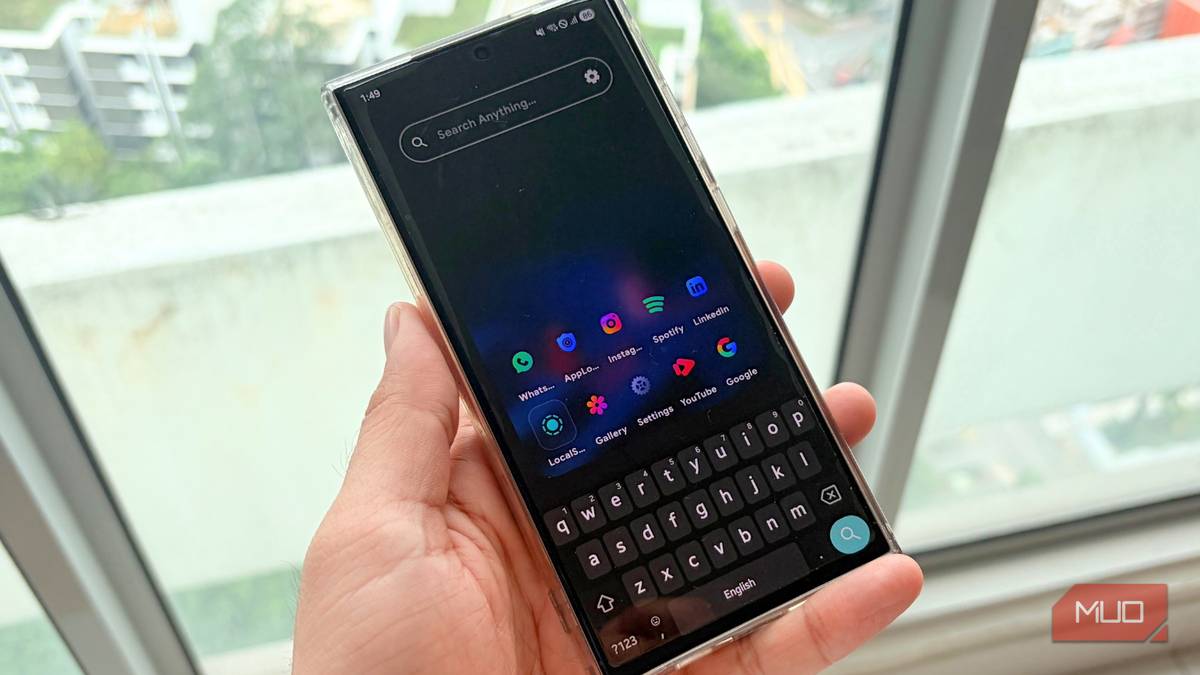
We live in a world where there is an app for everything. From ordering groceries to turning on our washing machines to even getting a good night’s sleep, there is a digital solution for every task. But while these apps promise convenience, they often make our phones cluttered. Instead of making life easier, they bloat our devices. And on many occasions, leave us endlessly scrolling through a sea of icons just to find the one app that we actually need.
It has happened to me so many times that I have now started to use the app drawer search bar. But that has limited powers, and I could only search for apps inside my app drawer. Thankfully, while researching, I stumbled upon a free, open-source tool called Quick Search that changed the way I navigate my smartphone. Here’s why you should start using it too.
Built-in options fall short
You can search for either apps or settings, one at a time

Android comes with a built-in search feature. They are available in the app drawer as well as inside the Settings menu. However, it is not only sluggish and fragmented, but the default search option is also limited.
While your phone’s Android OEM might have implemented the search function a bit better, you can generally search for either apps or settings, depending on your device, but not both simultaneously. Finding content like calendar events or files typically requires separate apps.
For instance, I have a Galaxy S24 Ultra running One UI 8 on Android 16. I can say that Samsung has done a good job of tweaking the search function. Just open the app drawer, tap the Search button, and you can search for anything. Be it your calendar event, web browser, YouTube, or a setting.
However, relying on the default search option means you have to jump back to your app drawer every time you want to search.
Quick Search is a game-changer
It is the best open-source and free alternative that you should use
When I began my search for something that would work anywhere and handle any query I threw at it, I started using the options available on the Google Play Store. However, I found most of the apps were filled with intrusive ads or required a subscription.
Quick Search stood out immediately because it is open source, meaning there are no hidden trackers or annoying ads, and the developer is completely transparent about how the app works. The best part is that everything happens on your device, so your searches and data stay completely private.
Opening this app will show you a unified search bar. The moment you start typing, it not only searches your phone for apps but also scans your entire phone, with no lag. Whether you are looking for installed apps, documents, images, contacts, or settings buried in the Developer Options menu, Quick Search handles it all.
One of the cool things about this app is that it handles typos very well. So, for instance, if I type “Spotifry” instead of “Spotify,” it understands what I mean. You can also long-press app icons to access their in-app shortcuts.
More than a search bar
It brings the macOS Spotlight experience to Android
Anyone familiar with macOS will recognize the Spotlight feature. It is basically a floating search bar over whatever you are doing, which can be triggered using a keyboard command. Quick Search delivers the same experience on Android through its optional Overlay Mode.
You can bring the search bar to any app or content you are viewing. So, for instance, if you are watching a YouTube video and suddenly remember you need to text your friend, you do not have to go back to the messaging app and exit YouTube to do so. Just trigger the overlay, type their name, launch their WhatsApp or Telegram chat directly from the search bar, and get right back to your video.
We all know how artificial intelligence has quickly made its way into our daily lives. Well, Quick Search packs one of the most modern features: Gemini API integration. By simply dropping your own API key, you can ask questions and get AI-powered answers directly within the search bar.
This negates the need to open a separate browser tab or the AI app to ask a complex question. You can have your answers instantly appear on top of whatever you are viewing or using.

9 Useful Android Apps That’ll Make Your Phone Smarter
Want a smarter phone? Replace your default camera, SMS, gallery, and other apps with these smarter alternatives.
The list of features goes on and on
The Quick Search app is filled with features that make it a powerhouse:
- Search with 20+ search engines: You are no longer tied to getting your web browsing answers from just one provider. This app lets you instantly route your searches to Google, DuckDuckGo, ChatGPT, YouTube, Perplexity, and more directly from the main bar.
- WhatsApp/Telegram/Google Meet integration: Aside from Gemini API integration, you can also look for your contacts from your favorite social media apps. You can just type their name in the search bar and jump directly to WhatsApp, Telegram, or launch a Google Meet video call.
- Calculator integrated into the search bar: If you happen to be in the middle of splitting the hotel bill, then you can simply type the numbers in the search bar, and it will solve the problem instantly.
- One-handed mode: Modern smartphones are getting bigger and bigger, and a 7-inch screen has become the new norm. Just like I love having the Quick Cursor app to handle my phone with one hand, the Quick Search app also has a one-handed mode, making it easier to reach your results.
- Set it as your digital assistant: You can replace your default voice assistant by mapping Quick Search to your phone’s digital assistant shortcut. A simple long-press of your power button or a screen swipe will bring Quick Search instantly.
- Completely ad-free and open-source: The app is free from intrusive pop-ups or hidden data tracking ruining your experience. The code is open-source, and all of your searches remain private.
- Customize it the way you like: You can change the way the app looks and feels, you can tweak the theme and adjust the interface. You can tell the app exactly what it should ignore, making your searches junk-free. It also comes with icon-pack support.
The app also allows you to set quick text triggers that instantly search for specific websites. For example, typing “yt” will re-route your search directly to YouTube.
Stop scrolling and start searching
Navigating your Android phone, even though it is a powerhouse, shouldn’t rely on the classic app drawer and scattered search tools. Quick Search changes things entirely and instantly speeds up your phone usage experience without asking for unnecessary app permissions. If you are ready to declutter your digital life, then this app is truly a universal search bar that you should have on your phone.
