
In mid-2023, Google rolled out Ad Privacy as part of its wider Privacy Sandbox initiative. It’s a Google feature designed to stop third-party cookies tracking you across the web.
On paper, it sounds great. Who doesn’t want more privacy?
But when I actually started looking into Google’s Ad Privacy, it wasn’t really what I thought, and I ended up turning it off altogether.
What Chrome’s Ad Privacy feature actually is
It’s not what you think
Google spent a lot of time stating that it was going to improve tracking and cookies on the web. Back in 2020, it first announced its Privacy Sandbox initiative, a process that would eventually culminate in Google phasing out third-party cookies, giving us a sliver of online privacy back.
It fully started rolling out around 2023, with Google aiming to phase out third-party cookies by 2025. Well, it’s 2026, and third-party cookies are alive and kicking, so what happened?
Well, Google is what happened. As per the EFF, in 2024, Google reversed its own decision on third-party cookies and advertising tracking. Around the same time, it also rolled out Ad Privacy, a new scheme designed to protect Chrome users from harmful third-party cookies.
Except it never replaced third-party cookies; it just became another tracking system sitting alongside the existing issue, but with greater emphasis on Google collecting your data.
Google’s Privacy Sandbox initiative — the broader program behind Ad Privacy — was officially shut down in October 2025. However, the Ad Privacy settings in Chrome remain active and on by default. It’s worth checking yours regardless.
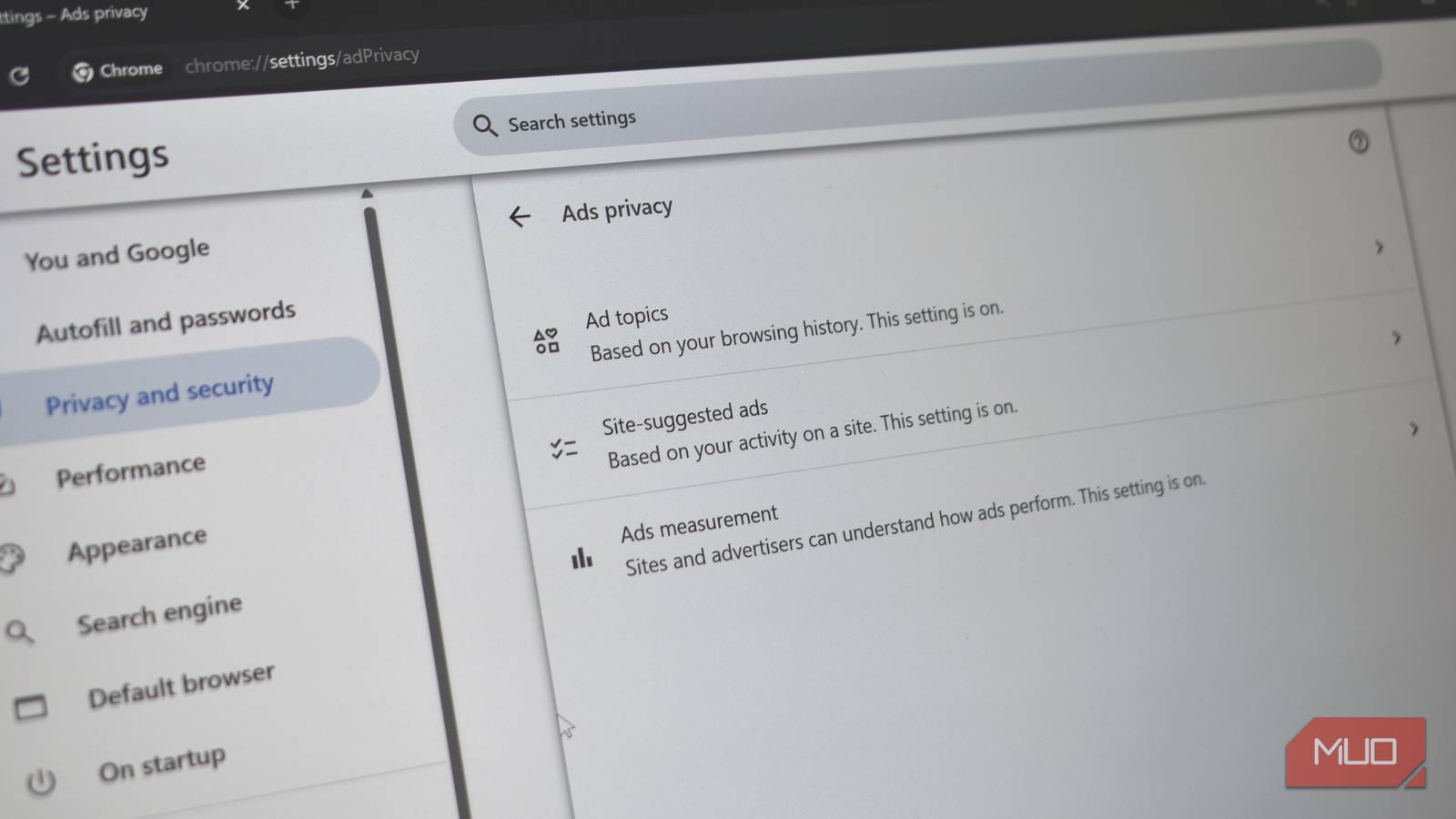
Ad Privacy has three main components:
- Ad topics: Chrome analyses your browsing history and assigns you a handful of interest categories—things like fitness, travel, or technology.
- Site-suggested ads: Websites can ask Chrome what kind of ads might be relevant to you based on your activity.
- Ad measurement: Let’s advertisers track whether ads are effective without (supposedly) identifying you directly.
As said, on paper, this actually sounds good. Your data stays on your device, and third-party cookies aren’t following you around. Google makes it sound like much of the burden of advertising tracking has been removed, but it’s not the case.
The tracking has been repackaged, and instead of websites profiling you, it’s now your browser doing it instead.
Calling it “Ad Privacy” doesn’t tell the full story
Glazing the advertising tracking
The problem with Google’s Ad Privacy system is that it doesn’t really explain what’s going on at a glance. The name “Ad Privacy” on its own is misleading, with the suggestion that it’s protecting you from tracking.
But all it’s doing is changing how you’re tracked. It effectively makes Chrome an even more active participant in tracking you online. Before, it was clear that websites and ad networks were tracking you, and your browser, in the middle, was the middle-person. Ad Privacy changes that, making Chrome an active participant in the tracking process, analyzing your moves, grouping you into categories, and sharing that data to serve targeted advertising. So even if the premise is that Google has closer control over how you’re tracked, Ad Privacy doesn’t stop tracking in a meaningful way.

I Don’t Trust Chrome’s Incognito Mode—I Use This Browser Instead
Chrome’s Incognito mode isn’t as private as you think.
Similarly, saying “local processing” makes it sound like your data is kept locally, but that’s not what happens at all. Your data is still shared with advertisers; Google just has an even tighter grip on it.
And that’s ultimately what didn’t sit right with me.
Turning it off won’t improve your privacy
It’s all tracking, all the way down
Tracking Method | What It Does | Stopped by Disabling Ad Privacy? |
|---|---|---|
Ad Topics (Chrome) | Browser categorises your interests and shares them with sites | ✅ Yes |
Site-Suggested Ads | Sites store ad suggestions about you in Chrome | ✅ Yes |
Third-Party Cookies | Ad networks follow you across sites | ❌ No |
First-Party Cookies | Sites track you directly (Google, Amazon, Meta, etc.) | ❌ No |
Browser Fingerprinting | Sites identify you via device/browser characteristics | ❌ No |
Account-Based Tracking | Platforms track activity while you’re logged in | ❌ No |
Here’s the other problem: turning off Ad Privacy doesn’t make you any more private. You’re still trading one tracking method for another.
You’ll still be at the whims of first-party tracking (Google, Amazon, Meta, website cookies, etc.), browser fingerprinting, and tracking directly tied to your online accounts.
Unfortunately, freeing yourself from those is exceptionally difficult on the modern internet. For example, we’re often told that clearing cookies is one way to stop online tracking. But that doesn’t actively stop websites from taking a browser fingerprint. To stop that, you need a Chrome extension that specifically targets fingerprinting.
That’s because the reality of the internet is that tracking comes in all forms, and even if you believe you’ve solved one problem, there is another one waiting to take its place.
How to turn off Ad Privacy in Google Chrome
It works profile-wide
Switching off Ad Privacy only takes a minute:
- Open Chrome Settings
- Head to Privacy and security
- Select Ad privacy
You’ll see three options
- Ad topics
- Site-suggested ads
- Ad measurement
You can toggle all three options off.
I’d also suggest checking back here after major Chrome updates to make sure everything is as you left it.

- OS
-
Windows, macOS, Linux, Android, iOS
- Price model
-
Free
Choose your advertising tracking poison
“Ad Privacy” sounds like something designed to protect you. In reality, it’s part of a system designed to preserve targeted advertising while making it look more privacy-friendly.
And to be clear, there are improvements compared to the old model. But it’s not the clean break from tracking that the name might suggest.
For me, that was enough reason to switch it off.
If you’re comfortable with your browser helping shape the ads you see, you might leave it on. But if you’d rather not have that happening quietly in the background, it’s well worth checking—and deciding for yourself.
